



How to Store Electronics in a Storage Unit Without Damage
When people store things, electronics are some of the most important and fragile things they do. The best way to make space during a move, when remodeling your home, or when cleaning up your office, is to learn how to store your devices. Electronics are small but complicated. They include computers, tablets, TVs, printers, and sound gear. They don't do well with heat, moisture, or rough handling, and storing them wrong can damage them permanently or cost a lot to fix.
If you live or run a company in Tulare County, Derrel’s Mini Storage in Visalia has clean, drive-up storage units that are easy to get to and have enough space to keep your things organized and out of harm's way. But you need more than a reliable unit to store gadgets safely. You also need to plan and pay attention to the little things. Here's how to keep your tools safe even when they're not being used for a long time.
Why Electronics Require Special Attention in Storage
Manufacturers do not design most electronics to be left alone for extended periods, especially in uncontrolled environments. The circuit boards, capacitors, power supplies, and processors inside your gadgets are very fragile. Dust, water, static electricity, and changes in temperature easily damaged these parts. If you don't pack and keep them right, even the screens, ports, and plastic surfaces on the outside can bend or break. Electronics, unlike furniture or general storage bins, need an extra layer of support and insulation. A simple bump while being moved or too much pressure from boxes stacked on top of each other can cause screens to crack, connections to break, or things to become out of place. If you let dust get into vents and ports, it can mess up fans, make the computer overheat, and stop starting up later. Not only does getting your gadgets ready for storage protect your investment, but it also saves you trouble in the future. And if you live in Visalia, where dry weather and warm summers are common, you need to take extra care to keep your things safe from heat and dust.
Clean Devices Carefully Before Packing
Make sure all of your gadgets are clean and free of dust before putting them away. Use a dry microfiber cloth to wipe down surfaces to get rid of dust and dirt that could scratch them or get stuck in air holes. Compressed air or a vacuum with a soft brush attachment can help get rid of dust and dirt from keyboards, speaker grilles, and other rough surfaces. Do not use products or cleaners for the home that could leave behind residue or water. Watch out for vents and fans more than usual. If dust builds up in these places, it can trap heat or hurt performance in the future. The dirt that builds up on the device even when it's not in use can cause long-term problems like rust or poor airflow when you turn it back on. Do not forget to clean the extras as well. Give the same care to game controls, remotes, external drives, and routers. After making sure everything is clean and dry, put the things you're packing in a cool place for a few hours to make sure there is no wetness left on the surface.
Remove Batteries and Back Up Your Data
Manufacturers build many current electronics with batteries that are built-in or removable, but these batteries don't hold up well during long-term storage. Over time, batteries, especially lithium-ion ones, can leak, rust, or lose power. If your device lets you, take the battery out completely and store it in a cool, dry place by itself. Put a label on it so you can find it again. Tablets and some laptops have batteries built in. Before putting them away, it's best to turn them off fully and charge the battery to about 50%. Over time, this makes the battery work better. If you store an uncharged device for months, it might not work again, and keeping it fully charged can also cause it to break down. Also, make sure you have a copy of your data on a computer, laptop, or drive before you store it. Even if you think it's safe, electronics can still break down. Having a backup makes sure you don't lose important files, papers, or photos that you can't replace.
Use Original Boxes When Possible or Reinforce with Padding
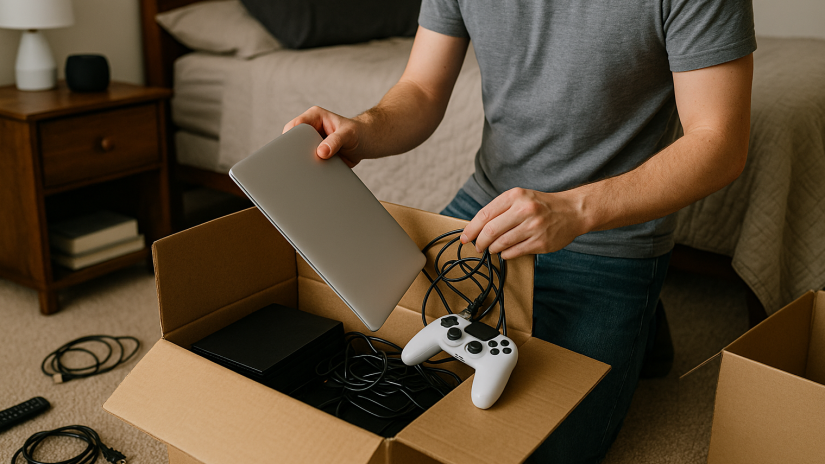
The manufacturer designed the packaging to keep your gadgets safe during shipping and long-term storage. If you still have the boxes from the producer, use them. They usually come with foam inserts, cardboard spacers, or molded protection that keep the device safe and snug. It's okay if those boxes are long gone. Pick strong bins made of cardboard or plastic that have room for covering on all sides. Protect things from static electricity with anti-static bubble wrap or soft clothes like cotton sheets or microfiber towels. Add extra padding to screens, buttons, and antennae that are likely to break to protect them. Put packing paper or foam in any empty spaces in the box to keep things from moving around. Do not wrap gadgets in plastic directly, as this can keep heat or moisture in. Also, never lay screens flat; always store them upright. This makes it less likely that they will break under weight. Put lighter items lower to prevent them from falling and damaging heavier items during transport.
Organize Accessories and Label Everything
Chargers, cords, remote controls, USB drives, and memory cards all need to be unplugged and put away separately, but it's important to keep them all in order. Messy lines not only waste time, but they can also damage pins or cause parts to be lost. Put each cord in a zip-top bag or storage box with a label and connect them with a twist tie or Velcro strap. Write the name of the gadget on the outside of each bag. Keep all the accessories for the same device in the same box or close by so you don't have to look for power supplies that fit later. This method also works well if you need to store things for business reasons or get them ready to sell again. Clearly marking everything prevents you from getting lost and ensures you won't forget important parts during setup.
Elevate Boxes and Prevent Dust Exposure
Never leave packed electronics on the floor of a storage room. Putting boxes on top of bins, shelves, or furniture protects them from dust, changes in temperature, and possible moisture transfer from concrete surfaces, even in dry, well-kept spaces. Place lighter boxes on top of heavier ones and don't put large items on top of screens or other fragile electronics. Put a light cotton sheet over the things you're storing to let air move and keep dust from getting to them. Do not use plastic wrap or blankets because they can trap water and cause condensation. Put things you use most often near the front of your unit and, if possible, use an aisle or open area in the middle. This lets you get to devices more easily without having to move things around, which lowers the risk of breaking something by mistake.
Keep an Inventory and Inspect Periodically
Making a simple list of what's in your unit is a good habit, whether you're keeping things for a short time or a long time. Write down the contents of each box, including storage methods, serial numbers, and notes on functionality. If you ever need to replace a cord or check a warranty, a phone picture or spreadsheet can come in handy. If you plan to use the unit for a long time, check on the electronics every couple of months. Check for signs of water damage, dust buildup, or box failure. You can fix anything that seems wrong before it does real damage. You can also switch out devices during these check-ins if you're replacing old ones, selling things, or just making sure everything is still working.
Store Smart and Stay Protected
It's easy to store gadgets, but you need to be a little more careful than with other things in the house. Cleaning, backing up data, organizing tools, using the right packing materials, and keeping things off the ground are just a few of the extra steps you can take to protect your tech investment. Derrel's Mini Storage at 3705 W. Connelly Ave, Visalia, CA 93291 is a safe, clean, and affordable place to store your electronics, home office supplies, or extra tech gear if you live in Visalia or the nearby areas. You can rent a storage unit on a flexible schedule and access the units through a drive-up door. You can get the space and peace of mind you need here, whether you're a student, a local business owner, or someone who needs to make room while moving.
Go to Derrel's Mini Storage in Visalia to see what sizes of units are available or to book space right now. Your tools will be safe until you need them again if you pack them well and store them in the right place.


